


Ringtones for Android™
4.220.44K Reviews
App Specs
- Version
- 15.12.6
- Updated On
- License
- Free
- Downloads
- 100,000,000+
- Developer
- Ringtones and Wallpapers Apps by Trela
- Categories
- Music & Audio
- Platform
- Android, iOS
Screenshots

 Analysis by AppCompare
I notice a phone’s ringtone most when several people are together and everyone’s device seems to make the same sound. That small moment is what makes Ringtones for Android™ appealing to me: it gives you a straightforward way to make your phone sound more like yours. It is a free music and audio app from Peaksel Ringtones Apps, focused on choosing sounds for calls, notifications, and alarms rather than managing a full music library. If you want a distinctive alert without turning ringtone setup into a project, its central idea is useful.
Making a ringtone feel personal
The practical value here is not simply having another sound to play. It is being able to choose an audio cue that suits the moment and gives you a better chance of recognizing your own phone. I like the idea of using a different style for a call than for an alarm: one can be expressive, while the other should be clear and easy to notice. That bit of separation can make a phone feel more considered without changing how you use it.
Ringtones are easy to overlook because phones arrive with built-in tones, and those are enough for many people. But if you share a home, work in a busy place, or often leave your phone among other people’s devices, a more individual sound has a practical purpose. It can help you identify your own alert in a room full of phones. I would still keep an everyday ringtone recognizable rather than choosing something so unusual that I might mistake it for background noise.
Choosing sounds for different moments
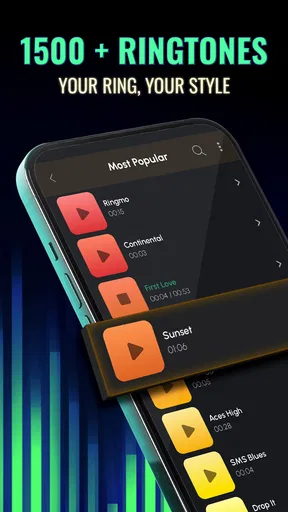
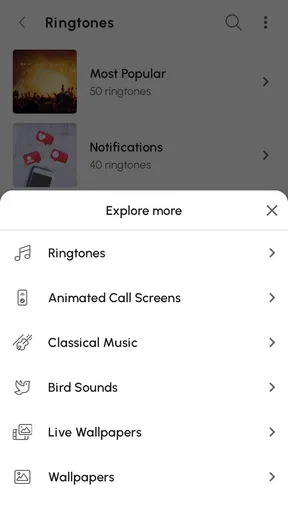
First off, let's talk about the sheer variety this app offers. With Ringtones for Android™, you get access to a treasure trove of sounds. We're talking thousands of ringtones, notification sounds, and alarm tunes. From the latest chart-toppers to classic hits, there's something for everyone. It's like having a music festival at your fingertips.
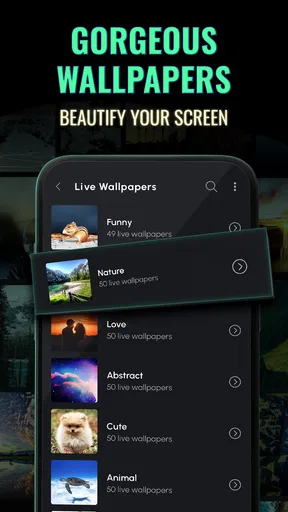
One of the features I found super handy is the categorization. Whether you’re in the mood for something funky, retro, or even a bit of nature sounds, the app has you covered. I’ve personally enjoyed switching my ringtone to a calming waterfall sound. It’s like a mini-vacation every time my phone rings.
The categories are most useful when you have a mood in mind but not a specific track. Instead of scrolling through a long, undifferentiated collection, you can start with a broad style and listen for a sound that fits. My tip is to audition a few options at the volume and in the setting where you normally notice calls. A tone that seems pleasant in a quiet room may be easy to miss in a noisy one, while a very sharp sound can become irritating if it interrupts you all day.
From browsing to a usable alert
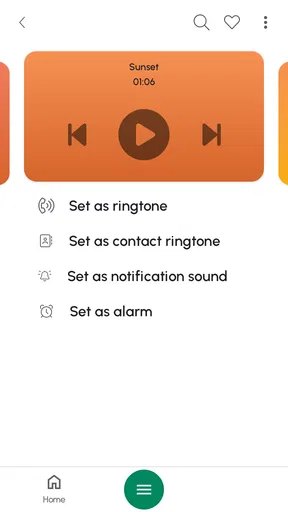
Now, you might be thinking, "Is it complicated to set up?" Not at all. The app's interface is as smooth as a well-mixed playlist. You can easily search for your desired tune and set it as your ringtone, notification, or alarm sound with just a few taps. It’s user-friendly, even for the tech-challenged among us.
Worth Reading Before You Choose

EA SPORTS FC Mobile 26 Is a Bigger Football Game, but It Takes Time

Flipboard Shows What News Apps Must Do Beyond the Feed

Switching to Android Auto Means Rethinking Your Driving Routine

Google Calendar Makes a Crowded Week Easier to Manage

Ludo King Makes the Most of the Minutes Between Plans

Baby Panda World Brings Quick Play to Modern Phones, but Its Game Library Feels Busy
That direct route from finding a sound to assigning it is the part I’d value most when I just want to change one thing and get on with my day. A useful workflow is to decide first whether you’re choosing for calls, alerts, or waking up; those jobs have different needs. A short, distinct notification can be convenient for frequent messages, whereas an alarm sound needs to be one you can hear and tolerate repeatedly. Treating every sound slot as interchangeable is an easy way to make a phone noisier rather than more useful.
Moreover, the app allows you to create your own ringtones! Yes, you heard that right. You can snip any part of a song and make it your own personal ringtone. So, if there’s a particular guitar riff or chorus that gets you grooving, you can loop that magic moment over and over.
Trimming a song is especially handy when the part you like comes after a long introduction. I’d listen to the selected section before saving it and avoid choosing a fragment that starts too abruptly or ends in the middle of a word or musical phrase. A clean beginning matters: if the phone rings only briefly, the sound should still be recognizable. This is also a good way to make a familiar song less intrusive by using a short section instead of letting a longer passage play.
Everyday use and the small details
Picture a typical workday: your phone is on a desk among a few others, and a call comes in while you are concentrating. A distinctive but not startling ringtone makes it easier to tell which device is ringing, and a separate, restrained notification sound can keep routine messages from feeling like calls. Later, a gentler alarm can make sense at home, where the goal is to wake up rather than catch your attention across a room. The app’s range of sound choices and its ability to assign them to different purposes make that kind of simple setup possible.
There is a trade-off in customizing every alert. If you make all of them musical, loud, or dramatically different, the phone can become distracting, and you may stop noticing the sounds that matter. I’d start with one change—usually the main ringtone—then use the phone normally for a day or two before adjusting anything else. That small test tells you whether the sound is actually useful, not just enjoyable while browsing.
What really sets Ringtones for Android™ apart is the quality of the sound files. Each ringtone is crisp and clear, which is crucial when you want to make sure you don’t miss any calls. Plus, the app regularly updates its library, so you’ll always find the latest and greatest tunes.
Not to mention, it’s light on ads compared to other apps out there. I know, ads can be a buzzkill, but here they’re not too intrusive. The app strikes a nice balance, ensuring you can enjoy your browsing experience without constant interruptions.
Compared with the usual alternatives, this sits between a phone’s built-in sound picker and the more hands-on route of finding and editing audio yourself. The built-in options are simpler if you only need a basic alert and do not want to browse a separate collection. Making a tone manually gives you more control over the source material, but takes extra effort. This app is the more convenient choice when you want to explore ready-made sounds or shape a short excerpt without turning the task into an editing hobby.
Discovery, sharing, and practical trade-offs
Another aspect I love is the community feel. The app encourages users to rate and comment on ringtones, so you get a sense of what’s popular and trending. It’s like having your own little music community right within the app. Plus, you can see what others are feeling and maybe discover a new favorite tune.
Ratings and comments can help narrow down a large collection, but I would use them as a starting point rather than proof that a sound will suit me. People choose tones for different reasons, and what is popular may not be easy to hear in my surroundings. I’d preview a promising option myself and judge it by its opening, its overall character, and whether I can imagine hearing it repeatedly without getting tired of it.
And if you’re feeling generous, you can share your custom creations with the community. It’s a neat way to spread some joy and maybe even get some feedback on your musical taste.
Sharing is most appealing if you enjoy making a ringtone that feels personal and want other people to hear your choice. If you only want a reliable call sound, though, that social side is optional; you can treat the app as a sound browser and stop once you have made your selection. I would also keep the distinction clear between choosing an available tone and using a song excerpt you have selected: the latter is a personal customization, not a reason to assume every track can be shared or used in every situation.
Who will get the most out of it
For someone who changes sounds often, likes browsing by style, or wants a particular slice of a song as a ringtone, the app offers more flexibility than relying only on default phone tones. It is also a reasonable fit for someone setting up a phone for a family member who wants a more recognizable call sound without learning a complicated editing workflow. On the other hand, if you keep your phone on silent, are happy with the built-in selection, or want a full-featured music player, this is not the tool I’d choose. Its purpose is focused on personalizing alerts.
The app is free to install, with in-app purchases ranging from about fifty cents to around eighty dollars per item. That makes it sensible to explore the free experience first and decide whether any paid option matters to you before spending. It is rated Teen, has an average rating of 4.2 from around 619,000 ratings, and has been installed over 50 million times. Those figures suggest a widely used app, but they do not tell you whether its particular sound library matches your taste; a quick browse is still the best test.
It was released in 2013, and version 15.12.1 is the current version. The listed minimum operating system is Android 7.0, so it is worth checking your device’s software before planning to use it. For anyone who meets that requirement and wants a simple way to refresh call, notification, or alarm sounds, the app has a clear purpose. If your priority is a complete audio-editing suite or a no-browsing setup, a different approach will likely suit you better.
A considered way to personalize your phone
In a world where personal expression is key, Ringtones for Android™ hits all the right notes. It’s a fun, easy-to-use app that breathes new life into an often-overlooked aspect of our phones. Whether you’re looking to stand out in a crowd or just want to switch things up a bit, this app is a fantastic choice.
My recommendation is to begin with one sound you genuinely want to hear, rather than changing every alert at once. Preview it in context, keep important cues easy to recognize, and use the trimming option when a song’s best moment is buried in the middle. That approach makes the app’s customization feel useful instead of just decorative.
So, if you’re ready to wave goodbye to boring ringtones and hello to a personalized sound experience, give Ringtones for Android™ a try. Your ears—and your phone—will thank you!
Pros
- Wide variety of ringtone options.
- Easy-to-use interface.
- High-quality sound files.
- Regular updates with new tones.
- Allows custom ringtone creation.
Cons
- Contains in-app advertisements.
- Limited free options.
- May require permissions for setup.
- Some tones are similar.
- No iOS version available.
FAQs for Ringtones for Android™
How do I set a ringtone from the app to my phone?
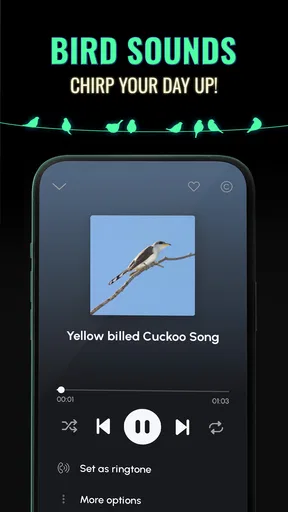
To set a ringtone using Ringtones for Android™, first browse the app's extensive library and select your desired tone. Tap on the 'Set as Ringtone' option, and the app will guide you through granting the necessary permissions. Once granted, the selected tone will be set as your default ringtone.
Is the app free to use, or are there any in-app purchases?
Ringtones for Android™ is free to download and offers a wide variety of tones at no cost. However, the app includes in-app purchases for premium content and an ad-free experience. These purchases are optional and are not required to enjoy the basic features of the app.
Does the app work offline, or is an internet connection required?
While an internet connection is necessary to browse and download new ringtones, Ringtones for Android™ allows you to access and set previously downloaded tones offline. This makes it convenient to switch ringtones without needing continuous internet access.
Are there any privacy concerns with using this app?
Ringtones for Android™ respects user privacy and only requests permissions necessary for its functionality, such as access to storage and settings. It does not collect personal data or track user activity outside the app. Always ensure you download the app from a trusted source like Google Play Store.
Can I customize or edit the ringtones within the app?
Yes, the app offers basic editing features that allow you to trim or loop parts of a ringtone to customize it to your liking. This feature is user-friendly and requires no prior technical skills, enhancing your personalization experience.


